Free copy and paste text tool
Font Generator - Copy and Paste Fancy Text
Create stylish text for Instagram bios, TikTok captions, Discord names, gaming profiles, and everyday messages. Type once, preview many styles, and copy your favorite font instantly.
What Is a Font Generator?
A font generator is a simple online tool that turns normal text into stylish Unicode characters. Instead of installing a font file, the tool swaps letters for symbols that look bold, cursive, gothic, small, circled, or decorative. The result stays as real text, so you can copy and paste it into profiles, posts, comments, names, captions, and messages.
Fancy Font is built for quick creative writing. Enter a name, phrase, bio, quote, or caption and the preview list updates with many copy-ready styles. You can use the generated text for a clean Instagram bio, a stronger TikTok caption, a standout Discord name, a gaming handle, or a fun status update.
How to Use This Copy and Paste Font Tool
- Type your text. Add a word, username, sentence, or caption in the input box above.
- Preview the styles. Browse the generated fancy text options and adjust the preview size if needed.
- Copy your favorite. Press Copy next to the style you like, then paste it into your app or profile.
No signup, design software, or download is required. The generator works in your browser and is free to use on mobile, tablet, and desktop.
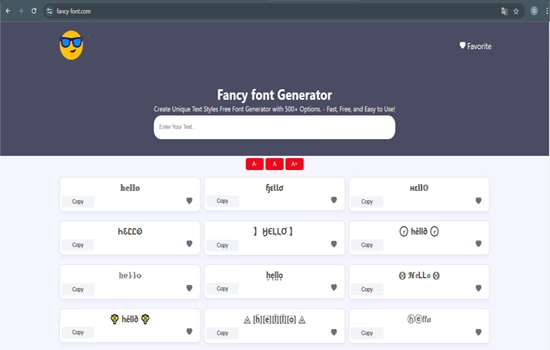
Popular Fancy Text Styles
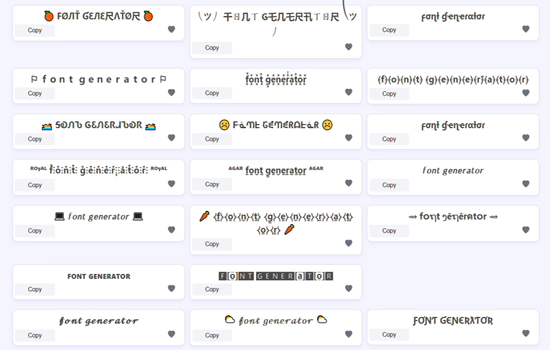
Different platforms and moods need different styles. For readable profile text, bold, italic, small caps, and cursive styles usually work best. For gaming names, framed, gothic, symbol, and decorated styles can make a handle feel more distinctive. For softer social captions, cute fonts, aesthetic spacing, and gentle symbols are often easier to read.
The best fancy text is noticeable without becoming hard to understand. If you are writing a bio or business name, choose a clean style. If you are creating a temporary caption, clan tag, or status, you can use a more decorative look.
Choosing the Right Style for Each Platform
Every platform has a different reading environment. Instagram profiles are scanned quickly, so a short name in bold or cursive text is usually stronger than a long decorated sentence. TikTok captions are read on small mobile screens while a video is playing, so a clear hook matters more than heavy symbols. Discord names appear in member lists and chats, which makes compact styles easier for friends to recognize.
A good font generator should give you options without forcing one style on every use case. Try a clean style for your main name, a more expressive style for a caption, and a symbol-framed style for gaming or temporary posts. If the text must be searched, tagged, or remembered, keep the most important word readable.
Copy and Paste Fonts for Bios, Captions, and Names
Copy and paste fonts are useful because they do not require an app install or image export. A creator can style a short phrase for a profile bio, a gamer can create a themed name, and a small brand can make a product caption stand out. The same text can be tested in several styles before you decide which one feels right.
For bios, use one or two styled words and keep the rest normal. For captions, style the opening phrase or the call to action. For names, avoid symbols that make the text impossible to pronounce or type. The goal is to add personality while keeping the message clear.
Where You Can Use Fancy Fonts
Generated text can be pasted into many apps that accept standard text. Common uses include Instagram bios, TikTok captions, Discord names, WhatsApp messages, Facebook posts, X profiles, YouTube channel names, gaming profiles, forum signatures, notes, and creative documents.
Some apps block certain symbols or display them differently across devices. If a style does not appear correctly, try a simpler option such as bold, cursive, monospace, small caps, or aesthetic spacing.
Why Copy and Paste Text Works Everywhere
Traditional fonts require a font file installed on the device. Unicode styles are different because they use special characters already supported by modern operating systems and browsers. That is why you can copy and paste the result like normal text. The appearance travels with the characters instead of depending on a local font file.
Platform Compatibility: Where Each Style Actually Works
Support is not the same across every field of every app. The table below reflects the fields most people ask about. "Partial" means the field accepts the characters but something else breaks, such as search matching or a strict character limit.
| Platform | Display name | Unique username | Bio | Posts & comments | Notes |
|---|---|---|---|---|---|
| Partial | No | Yes | Yes | Styled names are not matched by search. Bio caps at 150 characters. | |
| TikTok | Yes | No | Yes | Yes | Bio caps around 80 characters. Styled caption text is not matched by search. |
| Discord | Yes | No | Yes | Yes | Usernames allow lowercase letters, numbers, underscores, periods only. Nicknames cap at 32 characters. |
| X (Twitter) | Yes | No | Yes | Yes | Handles stay plain. Decorated styles consume several characters each against the post limit. |
| Yes | n/a | Yes | Yes | Works in the profile name, about text, and messages. | |
| Partial | No | Yes | Yes | Real-name policy can reject styled profile names on personal accounts. | |
| YouTube | Yes | No | Yes | Yes | Handles stay plain. Channel names accept most styles. |
| Roblox & most games | Partial | No | Partial | Partial | Filters commonly reject unusual characters. Symbol frames around a plain name work more often than full substitution. |
| Hashtags (any platform) | No | A styled hashtag is a separate tag with effectively no traffic. Always keep hashtags plain. | |||
Two patterns hold almost everywhere. First, unique usernames and handles reject Unicode styling, because platforms need them to be typeable and unambiguous. Second, anything used for search, tagging, or linking should stay plain, since matching is done on the exact characters.
What Makes This Font Generator Useful?
This font generator is designed around speed and variety. The input box is simple, the previews appear in a long list, and each result has a copy button. You can also save favorite styles in your browser when you want to reuse the same look later. That makes it easier to keep a consistent profile style across different apps.
The tool is also practical for testing readability. Some fancy text looks great as a single word but becomes difficult in a full sentence. Previewing many options side by side helps you choose a style that fits the context instead of guessing after you paste it.
Common Mistakes to Avoid
A common mistake is styling every character in a long paragraph. Decorative text is most effective when it highlights a name, heading, short phrase, or visual accent. Another mistake is using too many symbols around a username, which can make it harder for people to remember or mention you.
Before saving a public profile, paste the result into the actual app and check it on mobile. If a box, missing character, or awkward spacing appears, return to the font generator and choose a simpler style. Clean text usually performs better than complicated text when people need to read it quickly.

Why Some Characters Show as Empty Boxes
An empty box, sometimes called tofu, means the device received the character but has no font that can draw it. This is a rendering gap on the reader's side, not a broken copy. Unicode substitution has no fallback: a character either renders or it does not, and it never degrades back to a plain letter.
Bold, italic, and monospace styles have the widest support. Circled, bubble, and fullwidth characters have narrower support and are the most common source of boxes on older phones. Heavily decorated styles built from combining marks are the least predictable, because rendering depends on how well the device stacks marks over a base letter.
If people report boxes, switch to a simpler style rather than assuming it is broken for everyone. You cannot fix it from your side, since the missing font is on their device.
Tips for Better Fancy Text
- Keep important usernames readable so people can search for you later.
- Use decorative symbols at the start or end instead of between every letter.
- Test the style on your phone before using it in a public profile.
- Use shorter phrases for highly decorated styles.
- Save favorite styles if you reuse the same look often.
Privacy and Browser-Based Use
The font generator is built for quick text styling, not account management. You do not need to create a login to generate fancy text, and the favorite feature stores saved styles in your own browser cookie. That makes it convenient to reuse a style without building a public profile or sending a saved list to a separate account system.
For sensitive information, avoid entering passwords, private codes, legal identifiers, or anything that should not appear in a visible preview. Treat the tool as a creative text editor for public-facing words such as bios, names, captions, short quotes, and display text.
Accessibility and Readability
Unicode characters can look beautiful, but not every reader or assistive technology handles them the same way. Screen readers may pronounce some fancy text letter by letter, and some Unicode symbols can be harder to understand than standard alphabet characters. If your message must be accessible to everyone, use stylish text as an accent and keep the main information in normal text.
For example, a profile can use a decorative name and a plain-language description underneath. A TikTok caption can use one styled hook and a normal sentence after it. A Discord name can include a small symbol frame while keeping the actual name readable. This balanced approach gives you the visual style of a font generator while keeping your message useful.
Fresh Style Ideas
Try using bold text for announcements, cursive text for signatures, small caps for minimalist bios, gothic styles for gaming profiles, and cute fonts for soft social content. You can also combine a simple word with stars, dividers, arrows, or brackets to create a cleaner copy and paste design.
If you manage more than one profile, keep a small set of repeated styles. A consistent fancy text look can make your name, bio, or content series easier to recognize across Instagram, TikTok, Discord, and other platforms.
Explore More Text Tools
Need a more specific style? Try the Instagram fonts page for bio-friendly text, Discord fonts for names and statuses, TikTok fonts for captions, cursive text for script styles, bold text for emphasis, or cute fonts for softer aesthetic text.
Frequently Asked Questions
Is this font generator free?
Yes. You can generate, copy, and paste fancy text for free without creating an account.
Are fancy fonts safe to use?
The generated output is text made from special characters. Avoid using very complex styles for passwords, legal names, or text that must be easy to search.
Why do some letters look missing on one device?
Some older devices or apps do not support every decorative character. Pick a simpler style if a symbol appears as a blank box.
Can I use styled text in a username or hashtag?
Usually not. Unique usernames and handles reject these characters, and a styled hashtag becomes a separate tag with no traffic. Keep both plain.
Do screen readers handle fancy text?
Not consistently. Some announce each character by its formal Unicode name and others skip it. Keep essential information in plain text as well.
Last reviewed: